
I gave a talk at phpXTokyo about Laravel Doctor and a small package I built that plugs package health information from Laraplugins.io into your laravel/doctor and your CLI. Here is the story and the technical content, minus the stage fright.
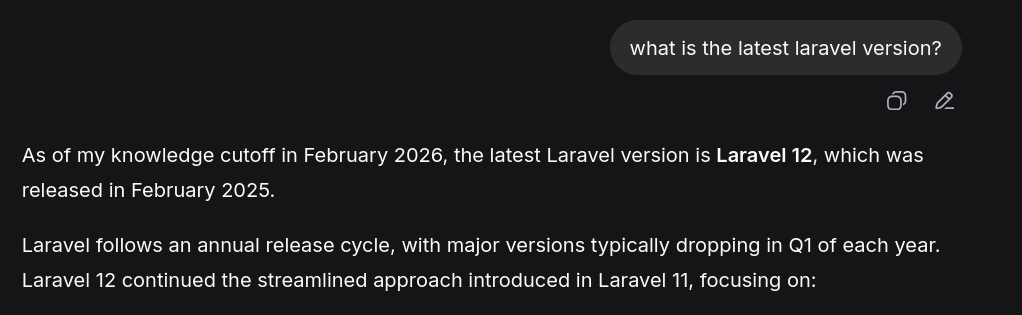
Ask an AI what the latest Laravel version is and, without web search, it will tell you Laravel 12, probably. Very confidently. It has no idea it is wrong.
That is the small, funny version of a much bigger problem. AI can build your project fast, and it can make you more productive. But it cannot follow your configuration and preference very well on the long term. You start with a clean starter kit, a clean state, and then the AI drifts. It changes config without checking whether the change makes sense for you. It installs packages that looked fine in its training data but are stale, unmaintained, or worse.
And the ecosystem is not small. LaraPlugins.io has indexed 83,664 Laravel packages. Only around 19,000 of them score healthy or medium health. Everything else is old, stale, or abandoned.
AI can find you a package in seconds. What it cannot do is tell you whether that package is still alive.
Most devs solve the packages and config issues by reviewing the code, but when time does not allow it what if some tools could at least partially help in this?
Laravel is building guardrails
Laravel has been shipping a lot of tooling to steer both human and AI development. Laravel/Boost, Laravel/Vet, Laravel/PAO, Laravel/Moat, and Laravel/Doctor. You probably know the first one. The others are newer.
For this talk I focused on the last one, because it solves a problem I run into constantly: checking that your project's current state is actually healthy.
What Laravel Doctor is

Laravel Doctor is a brand-new first-party CLI tool. You install it as a dev dependency and run one command:
php artisan doctorIt runs a set of first-party checks and gives you an instant verdict on your project. It focuses on configuration, environment, and infrastructure issues. For some problems it will fix them for you. For others it gives you advice, because it cannot safely change them itself.
The verdict types are fail, warn, notice, pass, and skip.
 • Environment diagnostics
   ✔ .env file exists
   ✔ App key is set
   ...
 ┌ ⚠ Composer audit passes ─────────────────────────────────────┐
 │ Composer audit found vulnerable dependencies.                │
 │                                                              │
 │ Details                                                      │
 │                                                              │
 │ 1 security advisory was reported.                            │
 │                                                              │
 │ Suggested fix                                                │
 │                                                              │
 │ Update or replace the vulnerable packages reported by        │
 │ `composer audit`.                                            │
 └────────────────────────────────────────────── laravel/doctor ┘
 ...
 Doctor found failing diagnostics.
The part that matters most to me is that it is extensible. You can register your own diagnostics, or a third-party diagnostic, and Doctor will load and run it. That extensibility is what made a small idea possible: what if a diagnostic checked the health of your dependencies?
Extending Doctor is easy
You add a class, Doctor recognises it, loads it, and executes it. That is the whole story.
// Register a custom diagnostic
Doctor::diagnostic()
    ->name('my-check')
    ->selector('config')
    ->run(function () {
        // Your check logic here
        return verdict('pass', 'All good!');
    });
The gap: your dependencies
Doctor watches your configuration. But it does not know anything about the packages you install.
Maybe you check a package on LaraPlugins before you composer require it. Good. But after that? You never look at it again. Packages go stale quietly. A package that was healthy when you installed it can be abandoned six months later, and nothing in your project tells you.
So I built laraplugins/doctor-health: an extension that plugs into Laravel Doctor and checks your installed packages against the LaraPlugins health index.
composer require --dev laraplugins/doctor-healthOne command. It hooks into php artisan doctor, reads your installed packages, sends them to the index, and gives you an immediate response: which packages are healthy, which are medium, which are unhealthy, and which are not in the index yet.
How it works
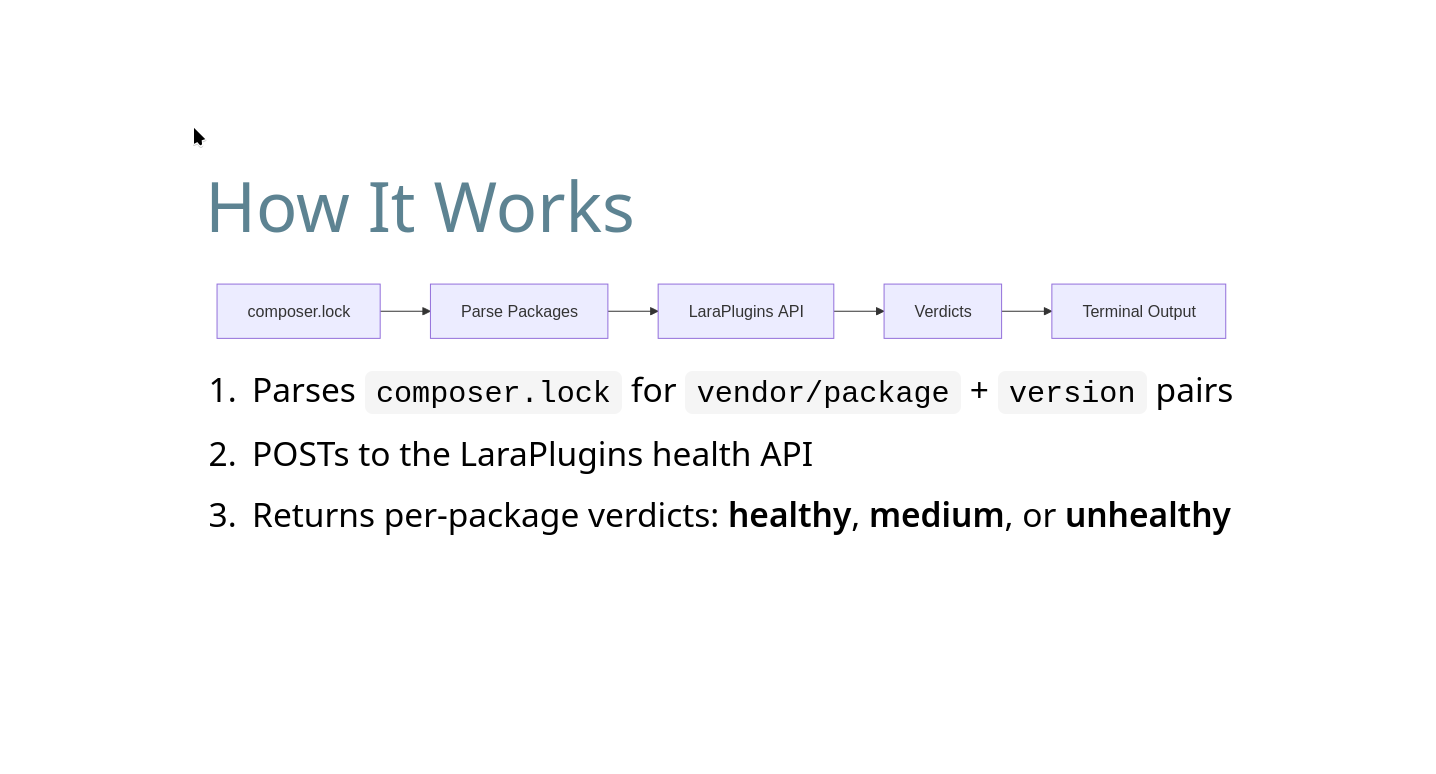
The plugin parses your composer.lock. It sees every installed package, not just the ones in your require block. It builds a list of package name plus version, and sends only that to the server.
The API returns a verdict for each package. If a package is not in the index yet, the plugin gives you a way to suggest it.
Privacy first
I tried to make this as privacy-focused as possible, because a tool that "phones home" deserves scrutiny.
What gets sent:
package names
package versions
What never gets sent:
your lockfile content
source or dist URLs
your paths, your env values, your app name
For private packages, you can configure exclusions so a package is never sent. On the server side I only keep minimal logs. To reduce spam I do see the request IP, but I salt and hash it, so no raw IP is stored. The package code is public, so you can verify all of this yourself.
Graceful degradation
I am not a big company. My server can go down, and it will go down sometimes. So the tool is designed around that.
If the server is unreachable, by default it does not break your CI pipeline. The check is signed as a warning, not an error. You can configure it to be stricter, but my goal is to keep it a warning. In the future cached results from earlier checks will be reused, so the second run on the same repo with the same versions does not hit the server again for 24 hours.
A diagnostic should never block your build. It should tell you the truth and get out of the way.
The twist I did not plan for

When I built LaraPlugins, my objective was to reach developers and save them time. That is why I built it. Humans were the whole point.
Then I looked at the traffic. Most of it does not come from humans. It comes from agents.
In August, the LaraPlugins MCP server handled 1,482,116 requests. In that same month the website had 8,800 unique visitors, about 9,400 visits and 16,300 total pageviews.
Laravel developers using the MCP server mostly use Cursor at 31% and Claude at 13.38%. What I found is that users visiting the site tend to navigate and explore it more to search related information about the packages and the vendors/maintainers.
So in the end, I built a website for humans and the machines just showed up.
That changed how I think about the project. The data is useful to both, and the CLI reaches developers in the place they already work. So the objective stays: help the human, and let the agents come along.
The API is public
The data behind all of this is available for free, with no registration:
https://laraplugins.io/api/v1/packages/healthIt is rate limited to keep me sane and to avoid a server upgrade. If you want to use it in your own tool or pipeline, send a list of packages and versions and you get a score back for each one. Documentation is available here for the API Laraplugins ApiDocs
Homework
I am a language school student, so I have a lot of homework all the time. This time I want to be the one giving it out. In the next days:
Install Laravel Doctor:
composer require --dev laravel/doctorRun
php artisan doctorand see what it says about your project.If you have a little more time, install
laraplugins/doctor-healthtoo (composer require laraplugins/doctor-health) and check how healthy your dependencies actually are.
Your dependencies are the foundation of your application. You should know how healthy they are. Now you can, from your terminal too.
Thank you to everyone at phpXTokyo. Feel free to reach out online.