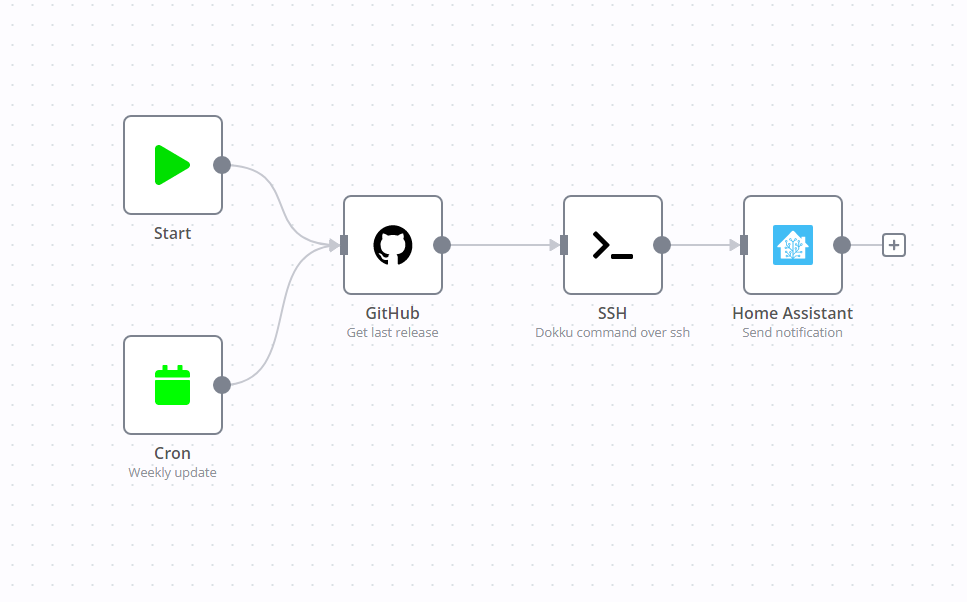
Do you have a dokku server, and do you want to periodically update your application without logging into your server? This workflow does that!
This simple workflow is designed to run weekly using the cron schedule node, but you can also trigger it manually whenever you want. It grabs the latest available version from GitHub, connects to your server via SSH, and issues the command to update your application. Once the SSH command completes, it sends a notification to your preferred notification service—mine is Home Assistant.
If the schedule doesn’t quite fit your needs, feel free to change it or remove it entirely. This workflow is also a fantastic candidate for combining with other workflows. For example, you could integrate it with a Telegram bot, allowing you to trigger app updates simply by chatting with a bot.
Another great use case is incorporating this workflow into a CI pipeline, running it automatically after certain actions on your Git repository.
You’re also free to swap out the notification service to one that suits you best.
To get this workflow up and running, you’ll need a few configurations: an SSH private key file, your GitHub OAuth app credentials, and credentials for your chosen notification service.
The workflow’s flexibility is impressive—you can even use it to update Dokku itself by modifying the SSH command. If you’re subscribed to the blog, you’ll find the specific expression I use for updating Dokku below.
The workflow file itself is available to everyone, so feel free to dive in and tailor it to your needs.
Want my expertize applied to you company? Contact me
Dokku update expression
wget https://raw.githubusercontent.com/dokku/dokku/{{$json["name"]}}/bootstrap.sh; sudo DOKKU_TAG={{$json["name"]}} bash bootstrap.shIf you change the nodes, make sure to update this string accordingly